Deployment Guide
This guide covers deploying @geekmidas workspace applications to various targets with the CLI's sophisticated deployment system.
Overview
The CLI provides a complete deployment pipeline for monorepo workspaces:
- The manifest - what
gkm buildwrites, and the seam every target reads - Environment Sniffing - detection of required environment variables for the code a construct cannot describe
- State Management - Track deployments across local and remote storage
- DNS Automation - Automatic DNS configuration with multiple providers
- Secrets Management - Encrypted secrets injection during builds
- Multi-App Orchestration - Coordinated deployment of workspace apps
The manifest is the seam
gkm build writes a manifest: every construct an app declared, and every edge between them. Deploying is a target reading that manifest.
src/constructs/*.ts        the declarations
        │
        ▼  gkm build
   the manifest            what exists, and what depends on what
        │
        ├──▶ --target=server / Dokploy   containers and URLs
        └──▶ --target=aws                RDS, S3, SNS, SQS, Lambda, …
The manifest records what is depended on, never what that implies. Turning an edge into an IAM policy, a security group, or a link is the target adapter's business — which is why the same declaration deploys to a container host and to AWS without naming either.
Where to go next
- Deploy targets:
dokploy,composeandsst, and how to choose - Running in production: secrets, state, health checks, telemetry, rollback
- Deploying from a program:
deploy(), its events, andgkm deploy --json
Quick Start
// gkm.config.ts
import { defineWorkspace } from '@geekmidas/cli/config';

export default defineWorkspace({
  name: 'my-saas',
  // The deployed stages type every per-stage map below: `domains: { qa: … }`
  // is a type error until `qa` is deployed.
  stages: { local: 'dev', deployed: ['prod', 'staging'] },

  // Where the constructs live. The apps come from them: a `StaticSite` is an
  // app, and so is every `RestApi`. Each one is its own deploy unit — one
  // container, one domain, and nothing to opt into.
  constructs: './constructs/**/*.ts',

  // Each deployed stage's base domain — read by every target and command.
  // The root site answers on it; every other surface on
  // `{subdomain}.{domain}`.
  domains: {
    prod: 'myapp.com',
    staging: 'staging.myapp.com',
  },

  // Who hosts each root domain's DNS, so gkm can write its records.
  dns: {
    'myapp.com': { provider: 'route53' },
  },

  deploy: {
    default: 'dokploy',
    // Whose deploy this is, on a server other workspaces share (optional).
    namespace: 'myorg',
    // Where every target pushes and pulls the apps' images.
    registry: 'ghcr.io/myorg',
    dokploy: {
      endpoint: 'https://dokploy.myserver.com',
    },
  },

  state: {
    provider: 'ssm',
    region: 'us-east-1',
  },
});# Deploy to production
gkm deploy --stage prodWhat each kind becomes
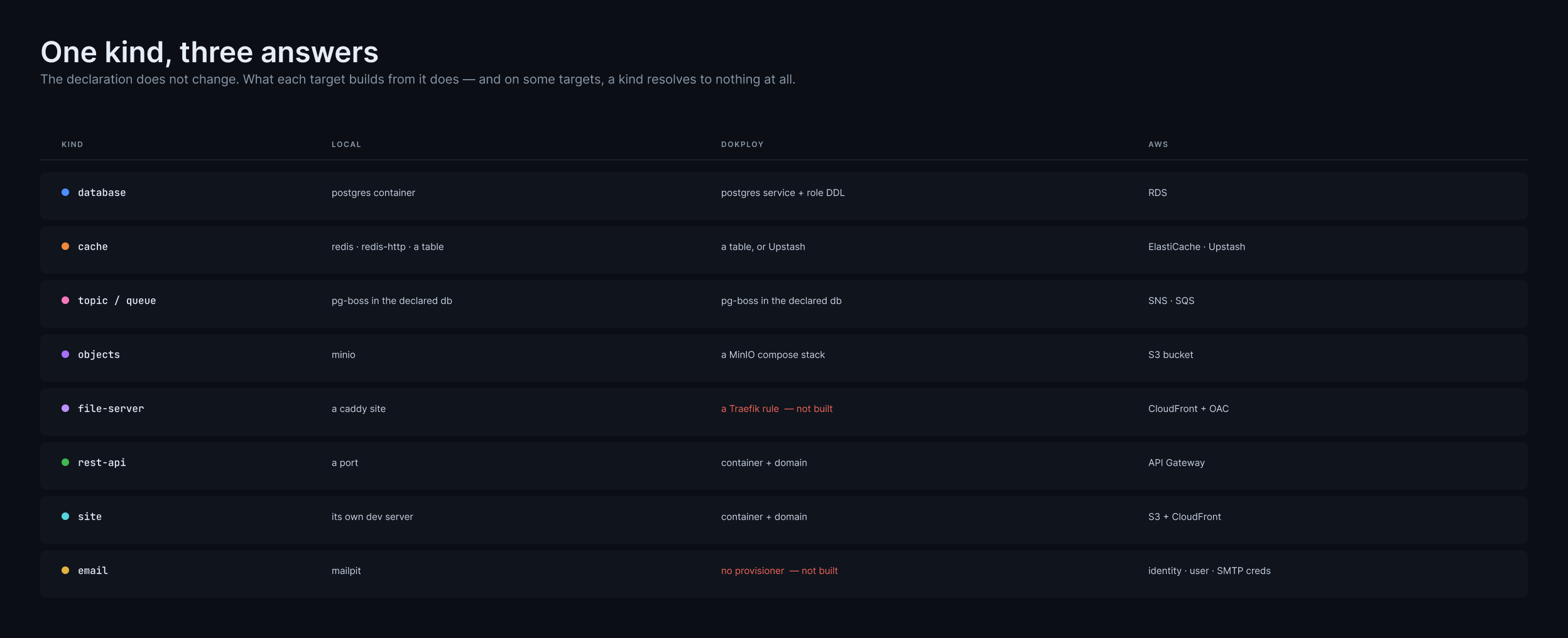
Click to zoom. The declaration does not change between targets; what gets built from it does. Two cells are red because they have no Dokploy provisioner yet — a file server's edge rule, and email.
Build Targets
gkm build builds for where the project deploys. deploy: { default: 'sst' } in gkm.config.ts builds for AWS; dokploy — the default when nothing is declared — builds a server. --provider aws|server overrides it, which is how a Dockerfile builds a server whatever the project deploys to.
Either way the manifest is written at the workspace root — .gkm/manifest/aws.ts or .gkm/manifest/server.ts — with every handler path relative to the root, since sst.config.ts runs there.
Server
Generates a standalone Node.js server application using Hono.
gkm build --provider server --productionOutput: <app>/.gkm/server/
app.ts- Hono application entry pointdist/- Production bundle (with--production)
A --production build bundles and minifies the server into a single file, serves a health check at /health, shuts down gracefully, and leaves out the dev tools (Telescope, the database API) and the OpenAPI spec. It serves HTTP only: a Worker's queue consumers, crons and topic subscribers are left out, and the build says what it left out (Serving Api only: leaving out 1 cron, …). Publishing is unchanged. Each Worker gets an entry of its own beside it, dist/worker-<worker>.mjs, which runs that worker's crons, consumers and subscribers and serves only /health; see Workers.
A package with native code — argon2, better-sqlite3, sharp — loads a binary from beside its own source, built for the platform it was installed on, so it is never inlined. The build finds each one the bundle imports (a binding.gyp, prebuilt binaries, a loader such as node-gyp-build, or a binary package per platform), leaves it out, and writes it at the version it resolved to dist/<bundle>.externals.json beside the bundle. The image installs exactly those, for Linux, next to server.mjs; for most apps that is nothing.
AWS
One Lambda per construct.
gkm build # with deploy: { default: 'sst' }Output: <app>/.gkm/aws/
routes/- one handler per endpoint (API Gateway v2)functions/,crons/,queues/,subscribers/
Environment Variables
The CLI handles environment variables differently in development and production.
Development (gkm dev)
In development, environment variables come from multiple sources:
1. Declared constructs
A declaration is what publishes a URL, under the key it owns:
new KyselyDatabase<Database, 'Orders'>('Orders'); // → ORDERS_URL, ORDERS_OWNER_URL
new ObjectStorage('Uploads'); // → UPLOADS_CONNECTION_STRING
new Cache('Sessions'); // → SESSIONS_URL
new Email('Mail'); // → MAIL_URL, MAIL_FROMWhich backend a cache or a broker resolves to is the deploy target's answer, not config: on a server the cache is a table in the database and events use pg-boss; on AWS the cache is Upstash and events use SNS and SQS. Each still generates its own URLs — a declared topic or queue its own <ID>_PUBLISHER_CONNECTION_STRING, which its producers and its consumers both read, plus EVENT_PUBLISHER_CONNECTION_STRING on pg-boss for the crons to schedule through. On the AWS target gkm dev creates each topic and queue on the local emulator, the way it creates MinIO buckets.
2. Secrets Store
Secrets from .gkm/secrets/dev.json are injected:
# Set a development secret
gkm secrets:set STRIPE_KEY sk_test_xxx --stage dev3. Per-App Mapping (Workspaces)
For multi-app workspaces, app-prefixed secrets are mapped:
API_DATABASE_URL=... → DATABASE_URL (for api app)
AUTH_DATABASE_URL=... → DATABASE_URL (for auth app)4. .env Files
Standard .env and .env.local files are loaded.
Production (gkm deploy)
In production, the CLI auto-injects these variables:
| Variable | Source | Description |
|---|---|---|
PORT | App config | From port in workspace config |
NODE_ENV | Auto | Always 'production' |
STAGE | CLI flag | Deployment stage name |
DATABASE_URL | Generated | Per-app credentials + Postgres service |
REDIS_URL | Generated | Redis service connection |
BETTER_AUTH_URL | Derived | https://{app-hostname} |
BETTER_AUTH_SECRET | Generated | Random secret, persisted in state |
BETTER_AUTH_TRUSTED_ORIGINS | Derived | All frontend URLs (comma-separated) |
Generated secrets are created once per stage and kept in its secrets store, so every later deploy reads the same values:
- Each
secretconstruct's value, such as an auth server's signing secret. It's random rather than derived, andgkm secrets:set AUTH_SECRET … --stage productionreplaces it with your own. - The stage's seed, which salts every password the Dokploy target derives: each database's master and roles, and each bucket's root user. Nothing in the repo is enough to compute one.
The first deploy of a stage generates both and writes them to the store; it prints 🔑 Generated for "production" (ssm): AUTH_SECRET, seed.
Custom secrets are injected from the secrets store:
# Set production secrets
gkm secrets:set STRIPE_KEY sk_live_xxx --stage production
gkm secrets:set SENDGRID_API_KEY SG.xxx --stage productionEnvironment Sniffing
Sniffing is what covers the code a construct cannot describe.
A declared construct needs none of it: the build knows UPLOADS_CONNECTION_STRING exists because ObjectStorage declared it, and knows which handler needs it because the handler named that construct in .dependsOn(). Sniffing is the fallback for hand-written services and entry files, where the only way to learn which keys are touched is to run the code and watch.
That difference is worth knowing when a variable goes missing: a construct's key is a fact in the manifest, while a sniffed key is an observation, and an observation can be wrong if the service throws before it reads.
Detection Strategy (Priority Order)
- Explicit
requiredEnv- Direct list in app config takes priority - Entry-based apps - Imports entry file to capture
envParser.parse()calls - Route-based apps - Calls
getEnvironment()on endpoint constructs - Frontend apps - Returns empty array (no server secrets)
How It Works
The sniffer runs your code in an isolated subprocess with a patched EnvironmentParser that records all accessed variables:
// Your code
const config = new EnvironmentParser(process.env)
.create((get) => ({
database: get('DATABASE_URL').string(), // Recorded!
port: get('PORT').number(), // Recorded!
}))
.parse();
// Sniffer detects: ['DATABASE_URL', 'PORT']Auto-Supported Variables
These variables are automatically resolved without manual configuration:
| Variable | Source |
|---|---|
PORT | App config or default |
NODE_ENV | Always 'production' |
STAGE | Deployment stage name |
DATABASE_URL | Generated per-app credentials (the hand-written path — a declared database publishes <NAME>_URL instead) |
REDIS_URL | Provisioned Redis service (a declared Cache publishes <NAME>_URL instead) |
BETTER_AUTH_URL | Derived from app hostname |
BETTER_AUTH_SECRET | Generated and persisted |
BETTER_AUTH_TRUSTED_ORIGINS | All frontend URLs |
Explicit Requirements
Override automatic detection:
// gkm.config.ts
import { defineWorkspace } from '@geekmidas/cli/config';
export default defineWorkspace({
name: 'my-saas',
stages: { local: 'dev', deployed: ['prod'] },
constructs: './constructs/**/*.ts',
// A config entry of the same name as a derived app overrides one field
// without restating the app. It is the exception, not the shape.
apps: {
api: { requiredEnv: ['STRIPE_SECRET_KEY', 'SENDGRID_API_KEY'] },
},
});DATABASE_URL is not in that list, and does not need to be: it comes from the declared database, which is the construct that causes the Postgres to exist.
State Providers
Deploy state records what a stage's deploys created (project, environment, application and domain ids, database credentials, generated secrets, each app's releases) so the next deploy finds them again. state.provider picks where it lives:
state: { provider: 'local' } // default: .gkm/deploy-<stage>.json
state: { provider: 's3', region: 'us-east-1' } // the project bucket gkm creates
state: { provider: 's3', bucket: 'my-app-deploy-state', region: 'us-east-1' } // a bucket you have
state: { provider: 'ssm', region: 'us-east-1' } // /gkm/<workspace>/<stage>/state, up to 8 KBEvery deploy takes the stage's lock (StateLocked for a second run; release a crashed run's lock with gkm state:unlock --stage <stage>), writes conditionally, and journals each resource as it creates it. Use S3 as soon as more than one machine deploys a stage; SSM holds a small stage only (see its size).
See Deploy state for the providers, locks, the journal, state:* commands and the v1 to v2 migration.
DNS Providers
dns, at the root of gkm.config.ts, says who hosts each root domain's DNS, so gkm can point the stage's hosts at the server:
- Dokploy writes an A record for each app's host on every deploy, pointing at the Dokploy server (resolved from its endpoint).
- Compose: every deploy (
gkm deploy --stage <stage>, orgkm compose --stage <stage>) writes each public host's missing or out-of-date record, pointing at the server in the stage's secrets (GKM_SERVER_IPV4), and reads it back from the provider before anything starts — one record per host, never a wildcard. See the compose guide.
The token a provider reads is a credential of the machine that runs the deploy. In CI, add it as a secret on the stage's GitHub environment and pass it to the deploy step's env — the workflows gkm init writes already do:
env:
GODADDY_API_TOKEN: ${{ secrets.GODADDY_API_TOKEN }}With a token provider configured and no token, the deploy fails at its start — before anything is created, built or started — with DnsCredentialMissing, which names the key.
// gkm.config.ts
export default defineWorkspace({
stages: { local: 'dev', deployed: ['prod'] },
domains: { prod: 'myapp.com' },
dns: {
'myapp.com': { provider: 'godaddy' },
'myapp.dev': { provider: 'route53', region: 'us-east-1' },
},
});Keyed by root domain; a host is matched to the longest one it is under. dns and domains used to live under deploy — a config that still has deploy.dns or deploy.domains fails to load with DnsMoved or DomainsMoved, which show the same value at the root.
gkm only ever writes the A, AAAA and CNAME records of the hosts the stack serves. Mail (MX), verification (TXT), NS and SOA records, and every other name, are never touched.
GoDaddy
dns: {
'myapp.com': {
provider: 'godaddy',
ttl: 600, // Optional — GoDaddy's minimum, and the default
},
},gkm uses GoDaddy's v1 records API one name and type at a time — GET and PUT /v1/domains/{domain}/records/{type}/{name} — and never the calls that replace a whole zone or every record of a type. A record that already has the right value is not written.
Credentials: a Personal Access Token, from the machine that runs the deploy — in CI the runner, never the server.
- In the GoDaddy developer dashboard, create a Personal Access Token with only the
domains.dns:updatescope. No domain or account scope is needed. - Set
GODADDY_API_TOKEN, or store it withgkm login --provider godaddy.
A token that may update records and not read them still works: gkm writes every record — a PUT is idempotent — and says it could not compare them first, and a dry run lists the records with "current value unknown".
GoDaddy's API restriction. GoDaddy only opens its Domains and DNS APIs to accounts with 10 or more domains, or with a Discount Domain Club Premier membership. A valid token on a smaller account is refused with 403 ACCESS_DENIED, which gkm reports as GoDaddyApiAccessDenied. The alternatives: move the domain's DNS hosting to Route53 or Cloudflare (change its nameservers at GoDaddy, keep the registration there), or use provider: 'manual' and create the records gkm prints.
The other failures are named too: GoDaddyScopeMissing (the token lacks domains.dns:update), GoDaddyCredentialsInvalid (401), GoDaddyDomainNotFound (the domain is not in the token's account), and GoDaddyRateLimited — GoDaddy allows about 60 requests a minute, and gkm waits out a 429's retryAfterSec a few times before giving up.
Route53
dns: {
'myapp.com': {
provider: 'route53',
region: 'us-east-1', // Optional, uses AWS_REGION env var
profile: 'production', // Optional, AWS profile from ~/.aws/credentials
hostedZoneId: 'Z123...', // Optional, auto-detected from domain
ttl: 300, // Optional, default 300
},
},Authentication: the AWS default credential chain (no login command): AWS_ACCESS_KEY_ID/AWS_SECRET_ACCESS_KEY, ~/.aws/credentials, the profile option, or an IAM role.
Hostinger
dns: {
'myapp.com': { provider: 'hostinger', ttl: 300 },
},Get an API token from the Hostinger hPanel profile, and store it with gkm login --provider hostinger (or set HOSTINGER_API_TOKEN) on the machine that runs the deploy — in CI, a HOSTINGER_API_TOKEN secret on the stage's environment.
Manual
dns: {
'myapp.com': { provider: 'manual' },
},gkm prints the records to create, and writes none.
How the hosts point at the server
By default every host gets an A record (and an AAAA record where the server has an IPv6 address). A domain can instead point its hosts at one name:
dns: {
'myapp.com': {
provider: 'godaddy',
// One A record for the target; a CNAME to it for every other host.
records: { mode: 'cname', target: 'server.myapp.com' },
// Or one target per stage:
// records: { mode: 'cname', target: { prod: 'prod-box.myapp.com' } },
},
},The apex (myapp.com itself) is always an A record — DNS allows no CNAME there. The target must be a name under the same domain; one that is not fails to load with DnsTargetInvalid. Moving a host between modes deletes its old A or CNAME record first, since a name cannot hold both. Used by the compose DNS step; the Dokploy target always writes A records.
DNS Verification
After creating records, the Dokploy target:
- Waits for DNS propagation
- Verifies records resolve to correct IP
- Caches verification in state (skips on subsequent deploys)
- Triggers SSL certificate generation via Dokploy
The compose target checks every host before its stack starts — see the compose guide.
Secrets Management
Setting Secrets
# Initialize secrets for a stage
gkm secrets:init --stage production
# Set individual secrets
gkm secrets:set STRIPE_SECRET_KEY 'sk_live_...' --stage production
gkm secrets:set SENDGRID_API_KEY 'SG....' --stage production
# Import from JSON file
gkm secrets:import secrets.json --stage productionGuided secrets
gkm secrets:add walks the keys a stage must be given, one at a time, for every app in the workspace at once. Run it from the workspace root:
gkm secrets:add --stage productionIt offers exactly the keys a deploy would refuse the stage without — the same list behind ExternalServicesNotConfigured — each once, with the construct that reads it, its kind, the apps that read it, and whether it is set:
| Kind | Keys | Built from |
|---|---|---|
| Bucket | <ID>_CONNECTION_STRING | AWS S3 (bucket, region), Cloudflare R2 (account id or endpoint, bucket), MinIO or any S3-compatible store (endpoint, bucket, path-style), or a pasted s3:// URL. Then, optionally, a key for that bucket alone, written into the URL percent-encoded — or the stage's shared AWS_ACCESS_KEY_ID/AWS_SECRET_ACCESS_KEY. Neither is required. |
<ID>_URL, <ID>_FROM | The mail service first. Resend (its API key: smtps://resend:…@smtp.resend.com:465), Amazon SES (the region and the SMTP credentials: email-smtp.<region>.amazonaws.com:587), Postmark (the server API token, as user and password: smtp.postmarkapp.com:587) and Mailgun (US or EU, then the domain's SMTP login and password: smtp.mailgun.org / smtp.eu.mailgun.org, 587) ask only for their secrets. Any other SMTP server: host, port (587 by default), user, password and TLS mode, as smtp:// (STARTTLS) or smtps:// (TLS on connect). Then the address it sends from. | |
| File server | <ID>_URL | Its public https:// address. |
External API, Credential | <ID>_CREDENTIALS | The construct's own schema: one prompt per field of a zod object (hidden for a field named like a secret, key, token or password), or the JSON itself for any other schema. |
A deployed stage on a server target is asked for all of them; the local stage only for third parties' credentials, since it runs Mailpit and MinIO itself. Nothing derived is ever offered: database URLs, generated secrets and the seed are the deploy's to make.
Each key is a checkpoint — unset keys first, then (without --missing) the set ones:
[1/4] MAIL_URL — where 'Mail' sends mail — any SMTP server
? MAIL_URL email 'Mail' · api
❯ Set it now
Skip
Stop hereSet it now builds the key and saves it to the stage's store at once, before the next one. Skip leaves it unset and moves on. Stop here ends the run. Every key set before a stop, a Ctrl-C or a failure is kept, and the run ends with what was saved, what was skipped and what the stage still lacks; gkm secrets:add --stage production --missing picks up the rest. A set key asks before it is replaced.
A key a provider on the stage creates is not a checkpoint. With deploy.objects.production: { provider: 's3' }, gkm deploy --stage production creates each bucket and writes its <ID>_CONNECTION_STRING (and its file server's <ID>_URL), so they are listed once instead:
Not offered — a provider on the stage creates them:
UPLOADS_CONNECTION_STRING — created by gkm deploy --stage production (deploy.objects.production is s3)The deploy creates them before its checks run, so a key it creates is never reported missing. Every value is checked before it is kept — an address must be one, a URL must be http(s):// — and credentials are checked against the construct's schema, showing each issue's path (SHIPPING_CREDENTIALS.apiKey: …) and asking again until it passes. Everything is saved through the stage's own store, as gkm secrets:set would, and no value is ever printed.
Without a terminal, list what the stage lacks as JSON, and set each key with gkm secrets:set:
gkm secrets:add --stage production --missing --json[
{ "key": "MAIL_URL", "kind": "email", "construct": "Mail", "apps": ["api", "auth"], "set": false },
{ "key": "SHIPPING_CREDENTIALS", "kind": "external-api", "construct": "Shipping", "apps": ["api"], "set": false }
]A key a provider on the stage creates carries "provisioned": true.
A third party's credentials are checked against their schema wherever they are set. gkm secrets:set SHIPPING_CREDENTIALS '…' refuses a value the ExternalApi's schema refuses, with CredentialsInvalid, and saves nothing; a deploy (dokploy, compose) refuses a stage holding one before it builds anything. Neither message carries the value.
Secret Types
Custom Secrets - User-provided key-value pairs:
gkm secrets:set API_KEY 'secret' --stage productionURL Secrets - Connection strings:
gkm secrets:set DATABASE_URL 'postgres://...' --stage production
gkm secrets:set REDIS_URL 'redis://...' --stage productionService Secrets - Auto-managed credentials:
POSTGRES_PASSWORD- Generated when Postgres provisionedREDIS_PASSWORD- Generated when Redis provisioned
Viewing Secrets
# Show secrets (masked)
gkm secrets:show --stage production
# Show secrets (revealed)
gkm secrets:show --stage production --revealRemoving a secret
gkm secrets:unset STRIPE_SECRET_KEY --stage productionRemoves one key from the stage's own store (the file, SSM or Secrets Manager) and keeps everything else. A key the stage does not hold is refused with SecretNotSet.
Stale addresses from an older gkm
Before constructs, starting a stage (gkm setup, gkm test --auto-setup, gkm secrets:reconcile, gkm init) stored an address for each app: <APP>_DATABASE_URL as a postgresql://…@localhost:5432/… URL with a <APP>_DB_PASSWORD, and http://localhost:<port> for a site or an auth server. Those keys can now belong to a construct — database.schema('AuthDatabase') provides AUTH_DATABASE_URL, new BetterAuth('Auth', …) provides AUTH_URL — and a deploy derives them. A value the stage holds is a value set by hand, which wins over the derived one, so the app would be handed localhost.
gkm compose and a Dokploy deploy refuse such a stage before building anything, with StaleStageSecrets, naming each key and how to remove it:
The stage 'production' holds a value an older gkm generated for an address a construct now provides:
AUTH_DATABASE_URL: AuthDatabase's, stored pointing at localhost
...
gkm secrets:unset AUTH_DATABASE_URL --stage productionRun the command it prints; the construct's own value is used from then on. Only a database's, a tenant's, an API's or a site's key holding a localhost (or 127.0.0.1) URL is refused. A managed database set with its real host — gkm secrets:set AUTH_DATABASE_URL 'postgres://…@db.example.com/…' — is a deliberate choice and still wins. gkm dev and gkm test need nothing removed: there, the derived address always wins.
Rotation
# Rotate service passwords
gkm secrets:rotate --stage production --service postgres
gkm secrets:rotate --stage production --service redisEncryption & Injection
During deployment:
- Secrets are filtered to only required variables per app
- Encrypted with an ephemeral master key
- Passed to
docker buildas a BuildKit secret (--secret id=gkm_credentials), read by the Dockerfile withRUN --mount=type=secret,id=gkm_credentials— never as build args, whichps, shell history anddocker historykeep. The file is owner-only and removed after the build. - Master key injected as
GKM_MASTER_KEYin the container's runtime environment — never printed. Output names it by fingerprint (the first 8 hex characters of its SHA-256), so you can tell which key a build used. - Decrypted at runtime by the application
gkm build --stage <stage> on its own writes the key to .gkm/server/master.key (mode 0600, kept out of the Docker build context) and prints only its path and fingerprint. Set GKM_MASTER_KEY from that file when you run the image yourself:
docker run -e GKM_MASTER_KEY="$(cat .gkm/server/master.key)" my-api:latestThe secrets store on AWS
A deployed stage's secrets live in the store secrets.store names (see the secrets store). Each store keeps the whole stage — service passwords, URLs and custom keys — as one JSON document in the stage's own account.
One bucket for state, secrets and backups
The recommended setup keeps everything gkm writes for a stage in the project bucket, gkm-<project>-<account id>, which the first deploy creates (see the state guide):
// gkm.config.ts
state: { provider: 's3', region: 'eu-west-1' },
secrets: { store: { provider: 's3' } }, // region and prefix come from stategkm-<project>-<account>/
gkm/<project>/<stage>/state.json deploy state
gkm/<project>/<stage>/secrets.json the stage's secrets
gkm/<project>/<stage>/backups/… backups- Encryption: SSE-S3. Every write asks for
AES256, though the bucket already defaults to it. There's no KMS key to manage. - History: the bucket's versioning keeps every past secrets document, and old versions expire after 90 days.
- Size: no limit, unlike an SSM parameter.
- Concurrency: each write is conditional on the ETag the command read (
If-Match). If twosecrets:setruns race, the second one fails withStageSecretsChangedand nothing is lost. Run it again. - Creation: a read never creates the bucket. Until the first write, a stage reads as having no secrets.
To use a bucket that already exists, name it with secrets: { store: { provider: 's3', bucket: 'acme-ops', region: 'eu-west-1' } }. region is required only when state isn't in S3. prefix defaults to the S3 state's prefix, else gkm.
gkm init --deploy sst writes this pair. Existing workspaces keep whatever store they name: an SSM workspace stays in SSM until you migrate it (below).
SSM and Secrets Manager
secrets: { store: { provider: 'ssm', region: 'eu-west-1' } },
// or, with a customer-managed key for new secrets
secrets: {
store: {
provider: 'secrets-manager',
region: 'eu-west-1',
kmsKeyId: 'alias/acme-secrets',
},
},S3 ('s3') | SSM Parameter Store ('ssm') | Secrets Manager ('secrets-manager') | |
|---|---|---|---|
| Kept as | object <prefix>/<project>/<stage>/secrets.json in the project bucket | SecureString parameter /gkm/<project>/<stage>/secrets | secret gkm/<project>/<stage>/secrets (no leading /) |
| Size | no limit | 8 KB. Written in the Intelligent-Tiering tier: standard (free) under 4 KB, advanced past it | 64 KB |
| Cost | S3 storage and requests | free under 4 KB; an advanced parameter is billed monthly per parameter | billed monthly per secret, plus per 10,000 API calls |
| Encryption | SSE-S3 (AES256) | the account's aws/ssm key | the account's aws/secretsmanager key, or kmsKeyId |
| Versions | bucket versioning, 90 days | parameter history (aws ssm get-parameter-history) | each write is a version; the previous one stays labelled AWSPREVIOUS |
| Concurrent writes | refused by ETag (StageSecretsChanged) | last write wins | last write wins |
SSM and Secrets Manager refuse a stage that's too large for them before AWS is called. The error is StageSecretsTooLarge, naming the stage, its size and the limit (8 KB for SSM, 64 KB for Secrets Manager), and nothing is written. On SSM the message points at S3.
IAM for the secrets store
The credentials that run gkm secrets:* and gkm deploy for a stage need the following permissions in that stage's account. Those credentials are either a developer's profile or the deploy job's role. The server needs none, because it never reads AWS.
S3: the one object, plus s3:ListBucket on the bucket, so that a stage with no secrets yet returns 404 rather than 403. In the project bucket, the first writer also needs the bucket-creation actions listed in the state guide:
{
"Effect": "Allow",
"Action": ["s3:GetObject", "s3:PutObject"],
"Resource": "arn:aws:s3:::gkm-<project>-<account>/gkm/<project>/<stage>/secrets.json"
}SSM
{
"Effect": "Allow",
"Action": ["ssm:GetParameter", "ssm:PutParameter"],
"Resource": "arn:aws:ssm:<region>:<account>:parameter/gkm/<project>/<stage>/secrets"
}Secrets Manager: the -* matches the six random characters AWS appends to a secret's ARN:
{
"Effect": "Allow",
"Action": [
"secretsmanager:GetSecretValue",
"secretsmanager:PutSecretValue",
"secretsmanager:CreateSecret",
"secretsmanager:DescribeSecret"
],
"Resource": "arn:aws:secretsmanager:<region>:<account>:secret:gkm/<project>/<stage>/secrets-*"
}A customer-managed key (kmsKeyId) also needs kms:Decrypt, kms:Encrypt and kms:GenerateDataKey on that key.
gkm deploy:github grants a compose stage's CI role exactly the statements for the store you configured. For S3, that's StageSecrets: s3:GetObject and s3:PutObject on secrets.json. If the state is in another bucket or elsewhere, it also gets StageSecretsBucket and the ProjectBucket creation actions. SSM actions are never added beside it.
Switching stores
gkm secrets:migrate copies a whole deployed stage from the store secrets.store names to another one. Nothing is regenerated, so running services keep their passwords. The command then reads the copy back and compares every key and value. It never deletes the source. Instead, it prints the command that would.
# 1. Copy prod from the configured store (here SSM) into the project bucket,
# from your laptop's credentials for the stage's account
AWS_PROFILE=acme-prod gkm secrets:migrate --stage prod --to s3
# ✓ Copied the secrets for stage "prod" from ssm to s3
# Verified: 14 keys read back from s3, equal.
# Next: set secrets.store to { provider: 's3' } in gkm.config.ts …
# … delete it with:
# aws ssm delete-parameter --name /gkm/shop/prod/secrets --region eu-west-1 --profile acme-prod
# 2. Point gkm.config.ts at the new store
# secrets: { store: { provider: 's3' } }
# 3. Check that commands now read it, deploy, then run the printed delete
AWS_PROFILE=acme-prod gkm secrets:show --stage prodThe command is safe to repeat. If the target already holds the same secrets, it writes nothing and checks the copy again. If the target holds different secrets, it refuses with MigrateTargetHoldsStage unless you pass --force.
For s3, the region comes from the S3 state, else from the configured store. For the other stores, it comes from the configured store. Pass --region to choose another. Run the migration once per deployed stage, then rerun gkm deploy:github so the CI role's policy follows the store.
Deploy targets
gkm deploy deploys a stage through a target: deploy.default, or --target <name> for one run. dokploy, compose and sst ship with the CLI; any other target is a package the project installs and names under deploy.targets.
gkm deploy --stage production # deploy.default (dokploy when unset)
gkm deploy --stage production --target composeSee Deploy targets for choosing one, deploy.targets and how a name resolves, and Writing a target for defineTarget.
Dokploy Deployment
Dokploy is a self-hosted deployment platform.
Initial Setup
# Login to Dokploy instance
gkm login --provider dokploy
# The CLI will prompt for:
# - Dokploy endpoint URL
# - API tokenDeploy Command
# Deploy to production
gkm deploy --stage production
# See what it would create or reuse, and change nothing
gkm deploy --stage production --dry-run
# Events as JSON lines on stdout, for CI or another program
gkm deploy --stage production --jsonAt a terminal, gkm deploy asks for a Dokploy login (and stores it) or a registry login when nothing else supplies one. With --json, or without a terminal, it never asks: a missing credential stops the deploy with MissingCredential, naming what was missing and how to supply it, and the command exits 1.
--dry-run takes no lock, writes no state, generates no secrets, makes only read calls to Dokploy, and builds and pushes nothing. It lists what a deploy would create (+) and what it would reuse (=).
Deploying from a program
gkm deploy is a thin wrapper around deploy() from @geekmidas/cli/deploy, which never prompts, prints or exits the process, and reports progress as events. See Deploying from a program.
The project's own code (its config, its constructs, each app's entry, its migrations) runs in a sandbox with an allowlisted environment. Credentials never enter it.
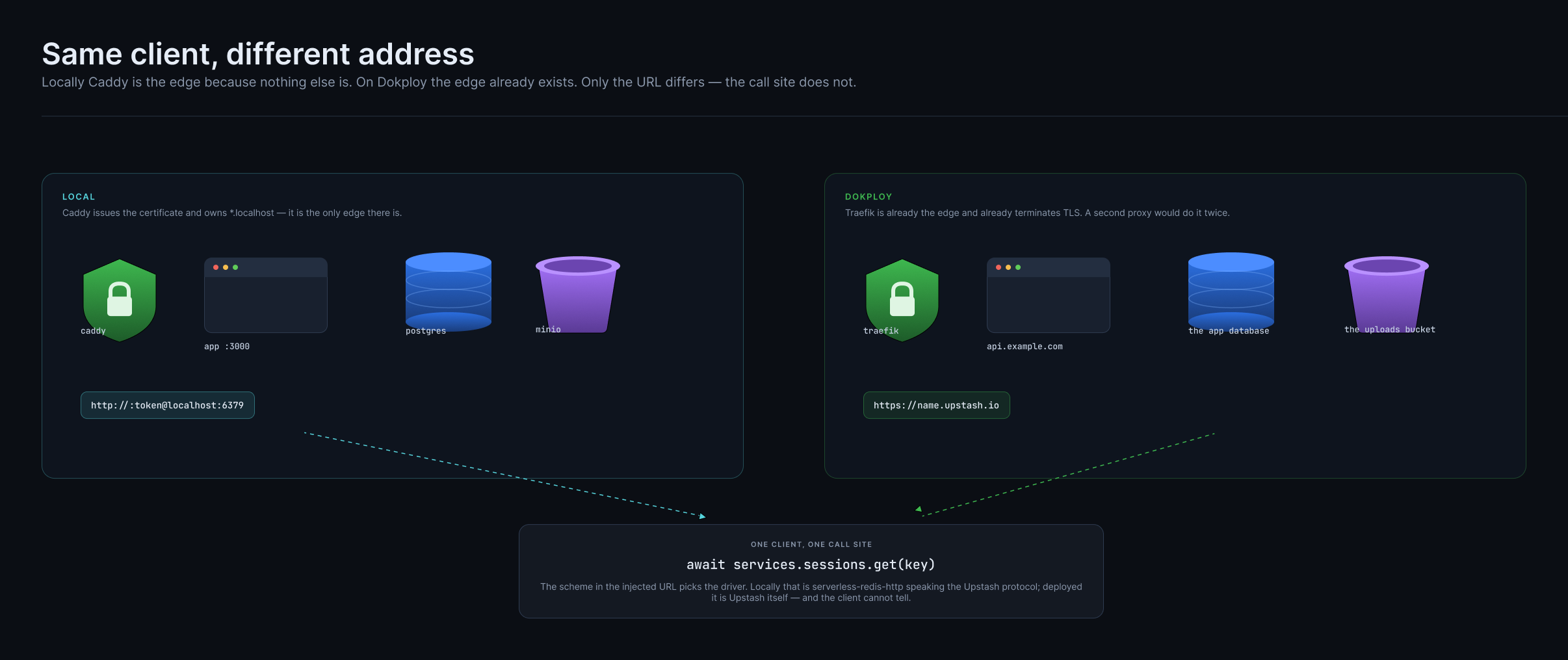
Click to zoom. Locally Caddy is the edge because nothing else is; on Dokploy Traefik already is one. Only the URL differs — the call site does not.
Identity: namespace, project, stage
A deploy names and claims everything it makes by its identity:
namespace—deploy.namespaceingkm.config.ts; defaults to the kebab-cased workspace nameproject— the workspace name, lowercasedstage—--stage
Its key, <namespace>/<project>, is the same from every stage, because one Dokploy project holds every stage as an environment. Two workspaces called shop deploying to one server stay apart as long as their namespaces differ:
namespace: 'acme' | namespace: 'globex' | |
|---|---|---|
| Dokploy project | acme-shop | globex-shop |
| application | production-acme-shop-api | production-globex-shop-api |
| image | ghcr.io/x/acme/shop-api:<tag> | ghcr.io/x/globex/shop-api:<tag> |
In the default namespace nothing is added: the project is shop and the application production-shop-api, the names a workspace was already deployed under.
A project is claimed, not matched. The project's description carries gkm:<namespace>/<project>. A deploy uses, in order: the project its stage state names; a project with its name and its marker; a new one, marked. A project with the same name in any case but no marker — or someone else's — is never adopted: the deploy stops with ProjectNotOwned before building anything. Set deploy.namespace, or add the marker to the project's description in Dokploy if it really is yours.
The registry is the one you configured. deploy.registry is where images are pushed (a deploy without one stops with RegistryNotConfigured). Dokploy's registry for it is, in order: deploy.dokploy.registryId, the one the stage's state recorded, and the one Dokploy holds for that registry's host and path — never simply the first one listed. Its id is kept in the stage's state, along with each app's image ref and the digest the push resolved to.
Upgrading an existing deployment
A stage deployed before identities has state holding its project id. That id is trusted, and the next deploy writes the marker into the project's description, so the project stays found even if the state is later lost. Images move to <registry>/<namespace>/<project>-<app>; nothing else is renamed.
What a deploy does
The unit list comes from the manifest, not from config: one rest-api is one server, one site is one site. An app you never listed in config still deploys if something declared it.
Provision what the manifest declares
- a Postgres per declared database, and the role DDL for it — a runtime role, an owner, and a reader where anything reads through one
- each declared bucket and
Emailfrom the stage's secrets (<ID>_CONNECTION_STRING,<ID>_URL,<ID>_FROM; a bucket's key in its URL or the shared S3 key pair, both optional) — a stage missing any failsvalidatewithExternalServicesNotConfigured. A stage whosedeploy.objectsnames a provider has its buckets and keys created by the deploy itself, beforevalidate, and each deploy checks the bucket answers its key (Providers). Only with--allow-dev-servicesis a bucket the stage does not account for a MinIO compose stack, and mail a Mailpit one (Mail and object storage) - pg-boss as a schema tenant of the database that already exists, when a queue or topic is carried by it — the only broker a Dokploy deploy provisions today (SNS on Dokploy would deliver to the server's push route, but is not provisioned yet)
- every URL the app needs, resolved and encrypted into the build
Apply the stage's migrations, then run its seeds, before any app is released. Both run in the deploy's sandbox — they are the project's own code — against the database's owner URL handed over as a secret file, through a port the deploy publishes for the purpose and closes again. A failed migration stops the run (DeployMigrationsFailed) before anything is released, and so does a failed seed (DeploySeedsFailed, naming the construct and the seed).
Every deploy migrates, then seeds, every time. A seed (db/<construct>/seeds) has no history: each one runs on every deploy of every stage, production included, in its own transaction, as the construct's owner. So a seed must be an idempotent upsert — reference data such as roles, permissions or plans, written with insert … on conflict … do update — and changing a seed and deploying is how that data changes. A seed that belongs on some stages only decides by the stage it is handed. A dry run lists the seeds a deploy would run.
Deploy the backends
- build each image and push it to the registry
- create the application, its domain, and its Let's Encrypt certificate
- wait for Dokploy's deployment to finish (
DeploymentFailed,DeploymentTimedOut), then check the app's health:healthyAfterconsecutive 2xx answers fromhttps://<host>/health - every backend is released and healthy before any site is; a backend that fails stops the run with
BackendDeployFailed
Then the frontends
- built with the backend URLs already known, so
VITE_*/NEXT_PUBLIC_*are real values at build time rather than placeholders - every site is attempted; if any fails, the run fails with
FrontendDeployFailedonce they all have
Then DNS, through the configured provider, and verify: each site answering at /.
Rollback. When release or verify fails, the apps that failed are pointed back at the image they ran before and redeployed. --atomic rolls back every app the run released instead, for apps that must move together. Each app's releases are kept in the stage's state (releases: current, previous and a history of 10). gkm deploy:rollback --stage <stage> --app <app> (or --atomic) does the same by hand, for a release that passed its checks and turned out wrong anyway. A rollback restores images only: migrations are forward-only.
How long each wait may take is deploy.dokploy.verify:
deploy: {
  dokploy: {
    endpoint: 'https://dokploy.myserver.com',
    verify: {
      deploymentTimeoutMs: 10 * 60_000, // Dokploy's deployment (default 10 min)
      healthCheckPath: '/health',       // a backend's health route (default)
      healthyAfter: 3,                  // consecutive 2xx answers (default 3)
      intervalMs: 2_000,                // between checks (default 2 s)
      healthTimeoutMs: 5 * 60_000,      // to become healthy (default 5 min)
    },
  },
},
See Running in production for health checks and rollback across targets.
Roles, not per-app users
Each declared database gets a role split — not each app:
CREATE ROLE "orders_production"        -- what handlers connect as
CREATE ROLE "orders_production_owner"  -- owns the schema, runs migrations
CREATE ROLE "orders_production_reader" -- only where something reads through one
ALTER ROLE "orders_production" SET search_path TO "app"
The application's own role holds no DDL rights, and the owner URL is never on a manifest edge — a handler cannot reach for it. A schema tenant (database.schema('AuthDb')) gets the same split inside the same cluster.
Not yet a privilege boundary
No target creates the per-schema role today: the tenant and its parent both connect as the owner, which makes a tenant a search_path rather than an isolation boundary. See the outstanding design notes.
AWS with SST
Pick AWS (SST) in gkm init (or --deploy sst --region eu-west-1) and the scaffold gets an sst.config.ts, a deploy:<stage> script per deployed stage, and the packages @geekmidas/cloud/sst needs.
pnpm run deploy:staging
# = gkm deploy --stage staging
gkm deploy through the sst target runs, in the deploy's sandbox:
gkm build --provider aws --stage <stage>— with no AWS credentials, since the build runs the project's code and needs none;sst deploy --stage <stage>— the one command handed AWS credentials, in its own environment;- a health check of each surface whose URL
run()returns: an API's/health, a site's/. SST writes those outputs to.sst/outputs.json; a surface that never answers 2xx fails the deploy withSurfacesUnhealthy.
The AWS credentials come from the deploy's CredentialProvider (kind aws). From the environment that is AWS_PROFILE when set — alone, over any exported keys, so leftover staging keys cannot redirect a production deploy — otherwise AWS_ACCESS_KEY_ID/AWS_SECRET_ACCESS_KEY/AWS_SESSION_TOKEN, which is what the scaffolded workflow's aws-actions/configure-aws-credentials step exports. Without either, the deploy stops with MissingCredential before anything runs. SST keeps no previous release, so a failed verify is not rolled back: fix and deploy again.
The scaffold sets deploy: { default: 'sst' } in gkm.config.ts, so gkm build builds for AWS and writes .gkm/manifest/aws.ts at the root — every construct the app declares — and sst.config.ts hands it to fromManifest. gkm init also adds a root tsconfig alias for it, @<project>/manifest. So the config lists no bucket, queue or IAM; what it holds is what a declaration cannot say:
// sst.config.ts (generated)
const region = 'eu-west-1';
const PROTECTED: string[] = ['prod']; // from stages.protected

export default $config({
  app(input) {
    return {
      name: 'shop',
      removal: PROTECTED.includes(input?.stage) ? 'retain' : 'remove',
      protect: PROTECTED.includes(input?.stage),
      home: 'aws',
      providers: { aws: { region } },
    };
  },
  async run() {
    const { App, fromManifest, Stack } = await import('@geekmidas/cloud/sst');
    const { backends, constructs } = await import('./.gkm/manifest/aws.js');
    const vpc = new sst.aws.Vpc('Vpc', { nat: 'ec2' });
    // …
    const provisioned = fromManifest(new Stack(app, 'Shop'), constructs, {
      Database: { vpc },                                      // RDS needs a network
      Mail: { from: process.env.MAIL_FROM as string },        // a verified SES sender
    }, backends);
    // Each surface's URL, for `gkm deploy` to health-check.
    return Object.fromEntries(
      Object.entries(constructs)
        .filter(([, c]) => c.kind === 'rest-api' || c.kind === 'site')
        .map(([id]) => [id, provisioned[id]!.provides().url]),
    );
  },
});
The two inputs are the ones the synth refuses to guess, and the overrides are typed from the manifest, so leaving one out is a type error in sst.config.ts rather than a failed deploy. Replace the created VPC with sst.aws.Vpc.get(…) if the account already has one. Protected stages keep their resources when the stack is removed.
Each RestApi's endpoints are mounted on its API Gateway, one Lambda per route. A Lambda is linked only to what its own endpoint depends on, and is placed in the database's VPC when it reaches a database. An iam authorizer is enforced by the gateway; any other is checked in the handler.
Docker Deployment
gkm docker writes a multi-stage Dockerfile per app (and a .dockerignore) without deploying anything. The dokploy and compose targets run the same generator; use it directly to build images yourself.
gkm docker                                    # write the files
gkm docker --build --tag v1.4.0               # and build the image
gkm docker --build --push --tag v1.4.0 --registry ghcr.io/acme
gkm docker --turbo                            # use turbo prune in a monorepo
The image reads its stage's encrypted credentials through a BuildKit secret, never a build argument, and needs GKM_MASTER_KEY at runtime. See Running in production: secrets.
Deploying from GitHub Actions
gkm init writes the workflows (see GitHub Actions): pull requests run CI, merged pull requests collect in a drafted release, and deploy.yml deploys stages. Nothing in it names a stage. Its first job runs the stages action, which runs the project's own gkm stages --github-output: the stages come from gkm.config.ts through gkm's own config loader, and the rules for each event are tested code in the CLI the project installed — not YAML, and not a script parsing TypeScript.
| Event | Builds (compose) | Deploys |
|---|---|---|
merge to main | every deployed stage | every deployed stage not in protected — e.g. staging |
| publishing the drafted release | — | the protected stages — e.g. prod |
| Run workflow | — | the one stage you type, at the ref you type |
Each stage builds and deploys in the GitHub environment of the same name. Put a required reviewer on a protected one if a release should also need approval.
The stages action
jobs:
  stages:
    runs-on: ubuntu-latest
    outputs:
      build: ${{ steps.stages.outputs.build }}
      deploy: ${{ steps.stages.outputs.deploy }}
      has-build: ${{ steps.stages.outputs.has-build }}
      has-deploy: ${{ steps.stages.outputs.has-deploy }}
      aws-region: ${{ steps.stages.outputs.aws-region }}
    steps:
      - uses: actions/checkout@v4
      - uses: pnpm/action-setup@v4
      - uses: actions/setup-node@v4
        with: { node-version: 22, cache: pnpm }
      - run: pnpm install --frozen-lockfile
      - id: stages
        uses: geekmidas/toolbox/actions/stages@<commit> # @geekmidas/cli <version>
        with:
          stage: ${{ inputs.stage }}   # only read on workflow_dispatch

  deploy:
    needs: stages
    if: needs.stages.outputs.has-deploy == 'true'
    strategy:
      matrix:
        stage: ${{ fromJSON(needs.stages.outputs.deploy) }}
    environment: ${{ matrix.stage }}
    # …
The action needs the project checked out and its dependencies installed: it runs gkm from them (the package manager is read from the lockfile, or the package-manager input). Its inputs are event (default the run's event), stage and working-directory; its outputs, all strings fromJSON() reads, are local, deployed, protected, build, deploy, has-build, has-deploy and aws-region. A manual run naming a stage that is not deployed fails in this job, with an ::error:: saying which stages are. Every output, and how to pin the action, is in its README.
gkm init pins it to the commit its CLI was released from, so the action and the CLI it calls were released together. Upgrading the CLI does not move the pin; update both when you want the newer action.
Compose: build and deploy on the runner, run on the server
With --deploy compose the workflow splits the release in two (see Deploying from CI):
- build — on a push, for every deployed stage, in that stage's environment:
gkm compose --stage <stage> --build --push --tag <sha> --digests-file digests.json, then the digests kept as the artifactdigests-<stage>for 90 days. It assumes the stage's AWS role only whensecrets.storeis on AWS — S3, SSM or Secrets Manager (aws-regionis set); with the'file'store it assumes none. - deploy — for each stage the event deploys, one at a time per stage (
concurrency: deploy-<stage>). It resolves the commit — a release's tag (never itstarget_commitish), a manual run'sref, or the push — checks it out and installs, logs in to the registry (read), assumes the stage's role, downloads that commit's push build'sdigests-<stage>, writes the deploy key and the server's pinned host key, and runs onegkm compose --stage <stage> --tag <sha> --digests-file …with theGODADDY_API_TOKEN/HOSTINGER_API_TOKENsecrets of its environment. That run creates the stage's resources and DNS records, migrates its databases through an SSH tunnel, and starts the stack on the server's Docker engine over SSH (The server). Without digests (the build is older than 90 days) it deploys by tag, with a warning on the run.
The server runs nothing of gkm's and holds no credential: the cloud credentials, the DNS token, the stage's secrets and its deploy state all stay on the runner. So a release deploys exactly the images the push of its commit built and pushed; nothing is rebuilt for production.
Every value — the stage, the commit — reaches a script as an environment variable; none is pasted into one.
Dokploy and SST
gkm deploy builds, releases and health-checks a stage in one step from a checkout, so these workflows have no build job: the deploy job runs over the action's deploy list, checks out the event's commit (or the manual run's ref), and runs gkm deploy --stage <stage>, with GODADDY_API_TOKEN and HOSTINGER_API_TOKEN from the environment's secrets for the DNS records the deploy writes.
One-time setup, per stage
A stage usually lives in its own AWS account, so each is set up with its own profile:
# The stage's secrets, on this machine
gkm secrets:init --stage staging
gkm secrets:init --stage prod

# AWS (SST): OIDC role in the stage's account + the GitHub environment
gkm deploy:github --stage staging --profile acme-dev
gkm deploy:github --stage prod    --profile acme-prod
.gkm/ is gitignored, so a checkout in CI does not have the stage's secrets. On SST, gkm init sets secrets.store to SSM (see the secrets store): each stage's secrets are one SecureString in its own account. gkm secrets:set writes there, and the deploy reads there with the role the job assumed — no key on GitHub, and no pull or push step:
AWS_PROFILE=acme-prod gkm secrets:set POLAR_CREDENTIALS '{…}' --stage prodgkm deploy:github creates GitHub's OIDC provider in the account if missing and a role only this repository's <stage> environment can assume, then sets the environment's AWS_ROLE_ARN. With an AWS store (S3, SSM or Secrets Manager) there is nothing to hand over — the deploy reads the store with the role; with the 'file' store it sets GKM_SECRETS_KEY instead. No long-lived AWS keys are stored anywhere.
Which subject the role trusts
The role trusts exactly the sub GitHub puts in the deploy job's OIDC token, and that depends on the repository's OIDC settings. gkm deploy:github reads them (gh api repos/<owner>/<name>/actions/oidc/customization/sub) before it writes the trust, and prints the result as Trusted by:
| Repository setting | Subject |
|---|---|
| default | repo:<owner>/<name>:environment:<stage> |
| immutable subject (the default for repositories created after 15 July 2026) | repo:<owner>@<ownerId>/<name>@<repoId>:environment:<stage> |
custom template of repo, context, environment, repository, repository_owner, repository_owner_id, repository_id, repository_visibility | those claims, in the template's order — context is environment:<stage> |
custom template with a claim that depends on the run (job_workflow_ref, ref, sha, run_id, …) | refused with OidcSubjectNotSupported: set the repository back to the default or immutable subject |
A : inside a value is sent as %3A. When the settings cannot be read (no permission, or a GitHub Enterprise Server without the endpoint) it assumes the default format and warns, naming the endpoint to check.
A role that trusts the wrong format fails the deploy job with Not authorized to perform sts:AssumeRoleWithWebIdentity. Re-running the command repairs it: the trust is rewritten, and the output shows the change.
gkm deploy:github --stage prod --profile acme-prod
#   ✓ Trust: repo:acme/shop:environment:prod → repo:acme@1234/shop@5678:environment:prod
What the role may do
| The stage deploys through | The role gets |
|---|---|
| SST (or Dokploy, or a mix) | AdministratorAccess — SST creates its own stack |
compose only | an inline policy, gkm-deploy, naming only the stage's own resources |
A compose deploy builds and runs containers on a server; from AWS it needs only the stage's secrets — read, and written back when a deploy generates a new one — and, with the deploy state in AWS, the stage's state:
| Store | Allowed |
|---|---|
secrets.store S3 | s3:GetObject, PutObject on the stage's secrets object (<prefix>/<project>/<stage>/secrets.json), and s3:ListBucket on its bucket unless the state statements already cover it; with no bucket named, ProjectBucket as for state S3 below |
secrets.store SSM | ssm:GetParameter, ssm:PutParameter on arn:aws:ssm:<region>:<account>:parameter/gkm/<project>/<stage>/secrets |
secrets.store Secrets Manager | secretsmanager:GetSecretValue, PutSecretValue, CreateSecret on arn:aws:secretsmanager:<region>:<account>:secret:gkm/<project>/<stage>/secrets-?????? (and kms:Decrypt/GenerateDataKey through Secrets Manager when kmsKeyId is set) |
state SSM | ssm:GetParameter, PutParameter, DeleteParameter under /gkm/<project>/<stage>/ |
state S3 | s3:GetObject, PutObject, DeleteObject under <prefix>/<project>/<stage>/, and s3:ListBucket on the bucket; with no bucket named, ProjectBucket: s3:CreateBucket, PutBucketVersioning, PutEncryptionConfiguration, PutBucketPublicAccessBlock, PutBucketOwnershipControls, PutLifecycleConfiguration, PutBucketTagging on exactly arn:aws:s3:::gkm-<project>-<account> |
A compose deploy also creates the stage's resources, so the policy grants what those need — only when the stage uses them:
| The stage has | Allowed |
|---|---|
an s3 provider (deploy.objects.<stage>) | StageBuckets: s3:CreateBucket, ListBucket (HeadBucket), Get/PutBucketTagging, Get/PutBucketPublicAccessBlock, Get/PutBucketPolicy, Get/PutEncryptionConfiguration, Get/PutBucketVersioning, Get/PutBucketCORS, Get/PutLifecycleConfiguration on exactly arn:aws:s3:::<bucket name> and arn:aws:s3:::<bucket name>-?????? (the provider's fallback when the name is taken) for each declared bucket; StageBucketUsers: iam:GetUser, CreateUser, TagUser, ListUserTags, GetUserPolicy, PutUserPolicy, ListAccessKeys, CreateAccessKey, DeleteAccessKey on arn:aws:iam::<account>:user/gkm/<user name> for each bucket's user |
an ses mail provider (deploy.email.<stage>) | StageMailIdentity: ses:GetIdentityDkimAttributes, VerifyDomainDkim, SetIdentityDkimEnabled, GetSendQuota on * (SES scopes none of them to a name); StageMailUsers: iam:GetUser, CreateUser, TagUser, ListUserTags, GetUserPolicy, PutUserPolicy, ListAccessKeys, CreateAccessKey, DeleteAccessKey on arn:aws:iam::<account>:user/gkm/<user name> for each Email construct's user |
an ses inbox provider (deploy.inbox.<stage>) | StageInboxRules: ses:VerifyDomainDkim, DescribeActiveReceiptRuleSet, CreateReceiptRuleSet, SetActiveReceiptRuleSet, DescribeReceiptRuleSet, DescribeReceiptRule, CreateReceiptRule, UpdateReceiptRule, DeleteReceiptRule on * (SES scopes none of them to a name); StageInboxBuckets: the actions of StageBuckets on arn:aws:s3:::<bucket name> and arn:aws:s3:::<bucket name>-?????? for each Inbox construct's bucket; StageInboxTopics: sns:CreateTopic, TagResource, Get/SetTopicAttributes, Subscribe, Unsubscribe, ListSubscriptionsByTopic, Get/SetSubscriptionAttributes on each inbox's topic; StageInboxUsers: the actions of StageBucketUsers on each inbox bucket's user |
a route53 domain in dns | StageDnsRecords: route53:ChangeResourceRecordSets, ListResourceRecordSets on arn:aws:route53:::hostedzone/<hostedZoneId> (hostedzone/* when the domain names no hostedZoneId); StageDnsChanges: route53:GetChange on arn:aws:route53:::change/*; and, without a hostedZoneId, StageDnsZones: route53:ListHostedZonesByName on * — IAM cannot scope a lookup by name |
Writing a created key into the stage's secrets is the store's own PutParameter or PutSecretValue above. A stage that adds a provider or a route53 domain re-runs gkm deploy:github --stage <stage> to widen its policy.
With file secrets and local state the role is given nothing. A custom secrets store or state provider cannot be scoped, so it keeps AdministratorAccess. --policy-arn replaces either default, and --dry-run prints the policy.
gkm tags the role with the managed policy it attached (gkm:policy-arn). Re-running on a compose stage puts the scoped policy and detaches AdministratorAccess if gkm attached it. A role made before that tag existed keeps what is attached, and the output gives the aws iam detach-role-policy command to remove it.
For Dokploy, set the environment's values with gh. The workflow writes GKM_SECRETS_KEY to the runner, but the encrypted file it decrypts is under the gitignored .gkm/ — set secrets.store to a store CI can reach (SSM, Secrets Manager, or a custom one) before deploying a Dokploy stage from GitHub:
gh secret set GKM_SECRETS_KEY --env prod < ~/.gkm/keys/<namespace>/<project>/prod.key
gh secret set DOKPLOY_API_TOKEN --env prod
gh variable set DOKPLOY_ENDPOINT --env prod --body https://dokploy.example.com
What each environment needs
| Setting | Target | Set by |
|---|---|---|
variable AWS_ROLE_ARN | SST; compose with an AWS secrets.store | gkm deploy:github |
secret DEPLOY_SSH_KEY | compose | the private key of the user deploy.compose.server.<stage> names, which the server accepts |
variable DEPLOY_KNOWN_HOSTS | compose | ssh-keyscan <host>, checked by hand — the host key is pinned, never accepted on first sight |
variable REGISTRY_USERNAME, secret REGISTRY_PASSWORD | compose, registry other than ghcr.io | your registry (ghcr.io uses the workflow's own token) |
| the stage's secrets in S3, SSM or Secrets Manager | SST; compose with an AWS secrets.store | gkm secrets:set … --stage <stage> |
secret GKM_SECRETS_KEY | Dokploy ('file' store) | gh secret set |
secret DOKPLOY_API_TOKEN, variable DOKPLOY_ENDPOINT | Dokploy | gh |
secret GODADDY_API_TOKEN or HOSTINGER_API_TOKEN | a stage whose domain's dns provider is GoDaddy or Hostinger | gh secret set GODADDY_API_TOKEN --env <stage> |
Tests in CI need none of these: gkm test with GKM_AUTO_SETUP=1 generates throwaway secrets for the test stage.
Production Checklist
Before deploying to production:
- [ ] All tests passing (
pnpm test:once), type checks and lint clean - [ ] Secrets set for the stage (
gkm secrets:show --stage <stage>), in a store CI can reach - [ ] Each deployed stage has its GitHub environment (
gkm deploy:github --stage <stage>) - [ ] A remote state provider (SSM or S3) once more than one machine deploys
- [ ] DNS provider configured
- [ ] A dry run reviewed (
gkm deploy --stage <stage> --dry-run)
Running in production has the full checklist: the master key, health checks, telemetry, graceful shutdown, rollback and database connections.
Troubleshooting
Environment Variables Not Detected
If the sniffer misses variables:
- Ensure all
get()calls happen before.parse() - Use
requiredEnvin config for dynamic variables - A sniff that hangs is stopped after 30 seconds and reported; an entry that starts a server at import time is the usual cause
DNS Propagation Issues
# Check DNS resolution
dig api.myapp.com

# Re-deploying re-checks each hostname that has not been verified yet
gkm deploy --stage production
State Sync Issues
# Pull latest state from remote
gkm state:pull --stage production

# Compare local vs remote
gkm state:diff --stage production

# Replace remote state with the local copy
gkm state:push --stage production

# Release the lock of a deploy that was killed
gkm state:unlock --stage production
Database Connection Issues
Per-app credentials are stored in state. If connection fails:
- Check
gkm state:show --stage production - Verify credentials match Postgres users
- Re-run deployment to recreate users if needed