Getting Started
Version
This is the documentation for next — the line where the constructs paradigm lands. For the released line, see v9.
Prerequisites
- Node.js >= 22.0.0
- pnpm >= 10.13.1
- Docker (for the local containers
gkmderives from your constructs)
Install the CLI
pnpm add -g @geekmidas/cliCreate a New Project
gkm init my-projectThe Model: Everything Is a Construct
The thing worth learning first isn't a command — it's what changed underneath them.
A construct is one declaration in your application code that stands for a piece of infrastructure. A bucket, a database, a cache, a third-party credential, an API surface, a topic, a queue. You write it once, and three different consumers derive what they need from that one line:
| Derived | By whom | When |
|---|---|---|
| The function's environment | the framework | gkm build |
| Its runtime client | the framework | first request |
| The infrastructure — a container locally, a resource deployed | the target adapter | gkm dev / gkm deploy |
Before, each of those was written by hand, in a different file, and the only thing holding them together was a string literal typed three times:
// ❌ the old shape — a bucket declared three times
// 1. app code: a hand-written Service reading UPLOADS_NAME
// 2. sst.config.ts: new Storage(stack, 'uploads'), links, envVars
// 3. gkm config: services: { storage: true } → a minio container// ✅ now — one line, and all three derive from it
export const uploads = new ObjectStorage('Uploads');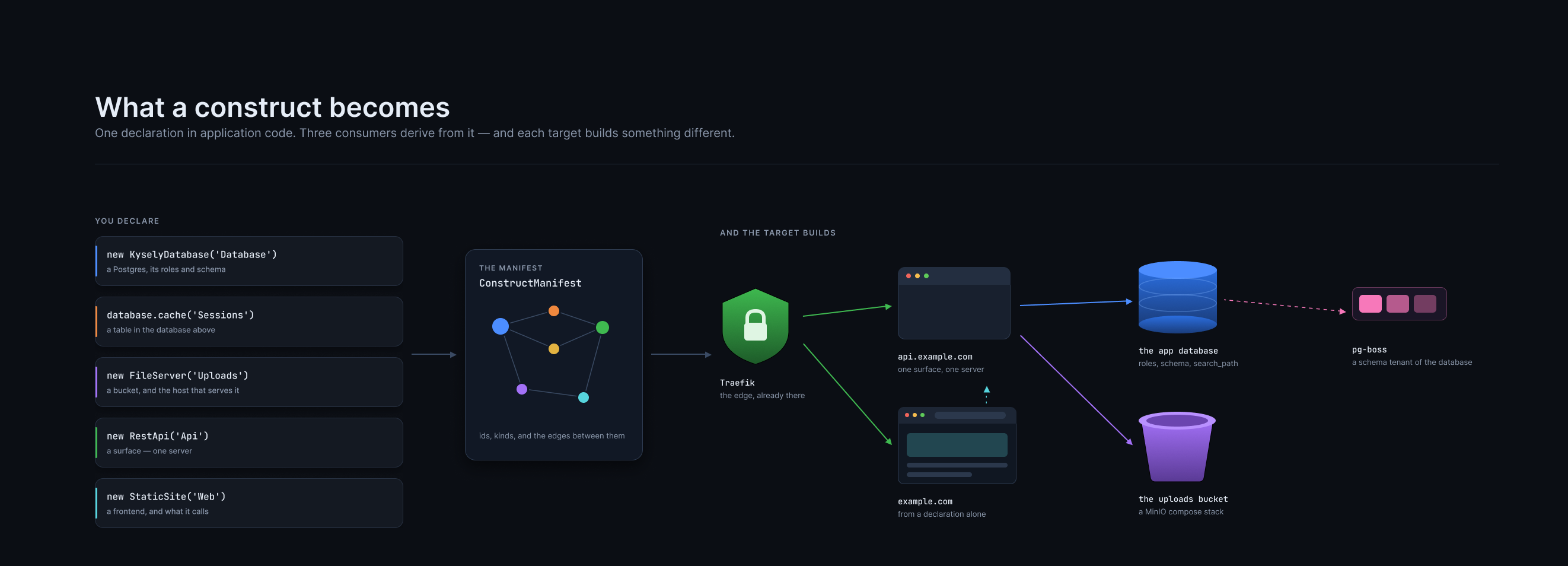
Click to zoom. One declaration on the left, the manifest in the middle, and what a Dokploy deploy actually built on the right — a Postgres with its roles, a MinIO stack, a container, a site, and pg-boss living inside the database that was already declared.
Rename the construct and every consumer moves with it, because there is no string to keep in step.
Read the design
The full argument — the dependency edge, why triggers aren't dependencies, why permissions are the adapter's business and not the manifest's — is in Constructs Paradigm.
1. Declare a Database
// src/constructs/database.ts
import { KyselyDatabase } from '@geekmidas/constructs/database/kysely';
import type { Generated } from 'kysely';

export interface Database {
  users: {
    id: Generated<string>;
    name: string;
    email: string;
    created_at: Generated<Date>;
  };
}

export const database = new KyselyDatabase<Database, 'Example'>('Example');
That single statement replaces what used to be a hand-written Service, a services: { db: true } entry in the config, and a DATABASE_URL nobody could trace back to a container. It declares the logical database, its schema, the owner/runtime role split, and the Postgres major version — read by the local target as a container tag and by the AWS target as the RDS engine version, so the two can't drift apart the way they used to.
A database that needs another image, for PostGIS or pgvector, names it in place of version, along with the extensions to create:
export const geo = new KyselyDatabase<GeoDB, 'Geo'>('Geo', {
  image: 'postgis/postgis:18-3.6-alpine',
  extensions: ['postgis'],
});
It's version or image, never both: the image's tag already says the major, and the type rejects a second statement of it. The image is yours to choose, and gkm runs it as written, locally and on Dokploy. Pick one that ships every extension you list. AWS runs RDS, which ignores image (RDS already ships PostGIS) and provisions the default major.
On every target, the cluster master then tries CREATE EXTENSION IF NOT EXISTS <name> SCHEMA public in that database before the first migration. That step is needed because PostGIS isn't a trusted extension, so the owner role a migration runs as can't create it. If the image doesn't ship the extension, Postgres says so: extension "postgis" is not available. public joins that database's roles' search_path, so geometry resolves without a schema prefix.
Locally, every database shares one Postgres container, so a named image runs all of them. Two databases naming different images is an error. On Dokploy, each database is its own cluster with its own image. Changing the image of a deployed cluster is applied on the next deploy, so keep it at the same Postgres major and C library: an Alpine image is musl, and the default Dokploy cluster is Debian (glibc).
Both type arguments or neither
TypeScript has no partial type-argument inference, so new KyselyDatabase<Database>('Example') leaves the name at string and widens the service key. Pass both.
Point the config at it:
// gkm.config.ts
import { defineConfig } from '@geekmidas/cli/config';

export default defineConfig({
  stages: { local: 'dev', deployed: ['prod'] },
  // One glob, every kind of resource. A declared ObjectStorage would never be
  // found by `routes:` or `crons:` — resources have no kind to be listed under.
  constructs: './src/constructs/**/*.ts',
  routes: './src/endpoints/**/*.ts',
  envParser: './src/config/env#envParser',
  logger: './src/config/logger',
  runtime: 'node',
  openapi: true,
});
Now run:
gkm devReconcile reads the glob, inspects every export of every matching module, and asks one structural question — does it have an id, and can it declare? From the answer it starts a Postgres container, creates the database, applies the roles and the schema, and injects EXAMPLE_URL before your server starts. Nothing lists postgres anywhere. The construct is why a Postgres exists at all.
Structural, not instanceof
A construct from a linked workspace or a second copy in the lockfile is still a construct. instanceof is exactly the check that would say otherwise.
The glob is how things are found — a file it misses does not exist
Discovery works by importing every file the glob matches and inspecting the exports. A declaration in a file the glob does not match is never imported, so as far as gkm is concerned it was never written.
Nothing reports this. There is no error and no warning, because an unmatched file is indistinguishable from a file that was never created. What you get instead is absence:
| You wrote | The glob missed it | What you see |
|---|---|---|
a KyselyDatabase | no Postgres container starts | the app fails on its first query |
an ObjectStorage | no bucket, no UPLOADS_CONNECTION_STRING | undefined where a URL should be |
| an endpoint | the route is not generated | a 404, and it is absent from the OpenAPI spec too |
The failure always appears somewhere other than the cause, which is what makes it worth knowing in advance. If something you declared seems not to exist, check the glob before anything else.
Two shapes that catch people:
constructs: './src/constructs/*.ts'    // ❌ one level — misses src/constructs/db/orders.ts
constructs: './src/constructs/**/*.ts' // ✅ any depth
Widening it is free. Discovery keeps only exports with an id that can declare(), so pointing at ./src/**/*.ts costs a little startup time and nothing else — and colocating a bucket with the feature that uses it is a perfectly good layout.
2. Use It From an Endpoint
// src/constructs/api.ts
import { RestApi } from '@geekmidas/constructs/rest-api';
import logger from '../config/logger';

// The surface every endpoint is built from. The logger it runs with, the
// authorizers it can name and the one it falls back to are stated here once,
// and never again per endpoint.
//
// `default` is required, and `'none'` is a valid answer that has to be typed
// out — an API that ships open because a field was left off is the one default
// worth refusing to have.
export const api = new RestApi('Api', {
  path: 'apps/api',
  authorizers: ['iam'],
  defaultAuthorizer: 'iam',
  logger,
});// src/endpoints/router.ts
import { api } from '../constructs/api';
import { database } from '../constructs/database';
// Branch the surface's factory for what a group of endpoints shares. The
// logger and the environment parser come along with it.
export const router = api.database(database);// src/endpoints/users.ts
import { z } from 'zod';
import { router } from './router';
export const getUsers = router
.get('/users')
.output(z.object({ users: z.array(z.object({
id: z.string(),
name: z.string(),
email: z.email(),
})) }))
.handle(async ({ db }) => {
const users = await db.selectFrom('users').selectAll().execute();
return { users };
});db is typed from the construct's schema. The execution wrapper opens the transaction and puts it in the handler context — including the RLS context when you configure one.
3. Depend On Things: .dependsOn()
.dependsOn() takes constructs, records the edge, and dissolves each construct's client into the handler's services under the construct's own id:
// src/constructs/uploads.ts
import { ObjectStorage } from '@geekmidas/constructs/object-storage';

export const uploads = new ObjectStorage('Uploads', { versioned: true });// src/endpoints/avatars.ts
import { uploads } from '../constructs/uploads';
export const createAvatarUpload = router
.post('/avatars')
.body(z.object({ contentType: z.string(), contentLength: z.number() }))
.dependsOn([uploads])
.handle(async ({ body, services }) => {
// services.uploads exists and types *because of* the .dependsOn above
return services.uploads.getUploadURL({
path: `avatars/${crypto.randomUUID()}`,
contentType: body.contentType,
contentLength: body.contentLength,
});
});From that one edge: the handler's env gets UPLOADS_CONNECTION_STRING at build, its client is bound on the first request, and the deploy target grants exactly the S3 access this function named — and nothing else. Permissions are not a framework concept and are not in the manifest. The manifest records what is depended on; what that implies on a given cloud belongs to the adapter.
.dependsOn() takes constructs only
A Service ({ serviceName, register }) doesn't match the shape. That's what keeps environment sniffing confined to the legacy .services() path instead of leaking back into the new one.
The Construct Catalogue
Everything below is real today. import { X } from '@geekmidas/constructs/…':
| Construct | Import | Handler gets | Local | Deployed |
|---|---|---|---|---|
KyselyDatabase | /database/kysely | db — a typed Kysely client | Postgres container | RDS |
ObjectStorage | /object-storage | StorageClient — write, presign | MinIO | S3 |
FileServer | /file-server | storage client plus url() / signedUrl() | MinIO | S3 + CDN |
Cache | /cache | CacheClient | Redis / Postgres table | Upstash, ElastiCache, or the database |
Credential | /credential | the parsed, validated value | injected secret | secret manager |
ExternalApi | /external-api | whatever its client builds | the provider, or its fake with --fake | the provider's URL |
Email | /email | a sender, typed by your templates | Mailpit | SES, Resend, or SMTP |
Topic | /topic | a publisher typed to its events, via .event(topic, …) or .dependsOn([topic]) | pg-boss / RabbitMQ / LocalStack | SNS |
Queue | worker.queue(…) | a publisher typed to its message, via .dependsOn([queue]) | pg-boss / RabbitMQ / LocalStack | SQS |
RestApi | /rest-api | — (a surface) | the dev server | API Gateway |
StaticSite | /site | — (a surface) | the dev server | CDN |
BetterAuth | /auth | the auth server | container | provisioned |
Thirteen declaration kinds in total. The local target reconciles all thirteen; the AWS target provisions twelve — rest-api is the one still outstanding. See what is outstanding.
Derived constructs
A database isn't only a database. The derived forms come off the parent, so the parent's id comes from the parent instead of from a string somebody has to keep in step:
export const database = new KyselyDatabase<Database, 'Example'>('Example');

export const replica = database.reader();       // ExampleReader — read-only role
export const cache = database.cache();          // ExampleCache — cached *in* this database
export const acme = database.schema<TenantDB, 'Acme'>('Acme');  // its own role and URL
database.owner;                                 // the DDL role, for migrations
reader() is enforced by the reader role's grants, not by which endpoint it reaches — which is why it stays correct even where a stage runs a single instance and the reader resolves to the writer's address.
cache() gives you a cache whose storage is this database: entries are rows in a table inside it (cache by default, or pass one), in this database's schema, reached by this database's role. It is the stronger statement of the two — new Cache('Sessions') says the app caches and leaves where to the deployment, while database.cache() says it caches here, which is a fact about the application and so belongs in its code. Declaring it this way pins it: a deploy target that puts a standalone cache in Upstash does not move this one.
The client is a CacheClient either way — a key/value store, not a query builder. Typing it as the parent would be a convenience that lies.
.dependsOn([cache])
.handle(async ({ services }) => services.exampleCache.get(key))
The table is DDL, so reconcile's owner role creates it. The driver never creates it lazily, for the same reason a handler cannot migrate: the role a handler runs as may not create anything.
Credentials have a shape
A secret is generated and rotated by the platform and is one opaque string. A credential is issued by someone else, arrives with several fields, and is worth validating on the way in:
import { Credential } from '@geekmidas/constructs/credential';

export const stripe = new Credential('Stripe', {
  schema: z.object({ secretKey: z.string(), webhookSecret: z.string() }),
});

// in a handler — no await, already fetched and validated at registration
.dependsOn([stripe])
.handle(async ({ services }) => services.stripe.secretKey)
It is one JSON value per stage, set with gkm secrets:set STRIPE_CREDENTIALS '{"secretKey":"…","webhookSecret":"…"}' --stage prod. A stage that was never given one fails gkm deploy, naming that command. A malformed or half-set credential fails when the process starts, not on the first request that needs the one field somebody forgot.
Triggers Are Not Dependencies
A trigger is what causes a function to run. A dependency is what it consumes while running. Keeping them apart is what lets a subscriber need no permission on its topic at all — the subscription is created at deploy, and at runtime it only reads its own queue.
// A topic: the event contract. Its publisher is its service.
import { Topic } from '@geekmidas/constructs/topic';

export const users = new Topic('Users', {
  events: {
    'user.created': z.object({ userId: z.string(), email: z.email() }),
  },
});// A worker: the process with no port that runs everything below
import { Worker } from '@geekmidas/constructs/worker';
export const worker = new Worker('Jobs', { logger }).database(database);// A subscriber — bound to the topic, granted nothing on it
export const sendWelcome = worker
.topic(users)
.subscribe(['user.created'])
.dependsOn([email])
.handle(async ({ events, services }) => { /* … */ });// A queue and its one consumer — one construct
export const orders = worker
.queue('Orders')
.message(z.object({ orderId: z.string() }))
.dependsOn([database])
.handle(async ({ messages, services }) => { /* … */ });// A schedule
export const dailyReport = worker
.cron('cron(0 6 * * *)') // or rate(1 day)
.dependsOn([database, uploads])
.handle(async ({ services }) => { /* … */ });Publishing is the only side that needs a connection string, so only the producer gets one. An endpoint, function or cron publishes to a topic with .event(users, { type: 'user.created', payload: (output) => ({ … }) }), sent once its handler has succeeded; name several topics and each event goes through its own topic's publisher. .event() also puts services.users in the handler, for an event the handler decides on itself. Sending to a queue is depending on it: .dependsOn([orders]), then services.orders.publish([{ type: 'Orders', payload }]).
Secrets and Credential Injection
gkm init bootstraps encrypted secrets for the development stage:
my-project/
├── .gkm/secrets/dev.json   # encrypted — safe to commit
├── gkm.config.ts
└── src/constructs/
The decryption key lives outside the repo at ~/.gkm/keys/my-project/my-project/development.key and never enters source control.
gkm dev and gkm exec decrypt and inject before your app code runs, via a preload that sets globalThis.__gkm_credentials__:
// src/config/env.ts
import { EnvironmentParser } from '@geekmidas/envkit';
import { Credentials } from '@geekmidas/envkit/credentials';

export const envParser = new EnvironmentParser({
  ...process.env,
  ...Credentials,
});
Credentials resolves in priority order:
globalThis.__gkm_credentials__— set by thegkm dev/gkm execpreload- Build-time decryption via
GKM_MASTER_KEY— CI/CD and Docker builds - An empty object
You need this less than you used to
Anything a construct provides — a database URL, a bucket URL, a cache endpoint — is derived and injected from the declaration. EnvironmentParser is for what's genuinely yours to configure, and Credential is for third-party values with a shape. Reach for a raw env key when neither fits.
Managing them:
gkm secrets:set STRIPE_KEY sk_test_xxx --stage dev
gkm secrets:show --stage dev
gkm secrets:rotate --stage dev
gkm secrets:init --stage production
Running Locally
gkm dev                    # reconcile containers from constructs, then serve
gkm exec -- pnpm db:migrate # one-off command with secrets injected
gkm test                   # tests, with containers and secrets
Each project's containers are scoped to that project, so two gkm dev sessions in two repos don't collide on ports or credentials.
Build and Deploy
gkm build writes the manifest — the seam between build and run. It records every declaration and every edge; what a given cloud does with them is the target adapter's business.
gkm build --provider server --production
gkm docker
gkm deploy --stage production
Deploy is not yet proven end to end
The AWS target provisions twelve of the thirteen kinds and its decisions are unit-tested as pure functions, but a stack has never come up. rest-api on AWS is outstanding. The Dokploy/server path is the one to use today.
Coming From v9
Each v9 shape has one replacement:
| v9 | v10 |
|---|---|
e.post(…), api.endpoints.post(…) | api.post(…), or a branch: api.database(db).post(…) |
.services([dbService]) with a hand-written Service | .dependsOn([construct]) |
.publisher(service) + .event({ type, payload }) | .event(topic, { type, payload }) |
Per-kind globs (routes, crons, subscribers) | one constructs glob |
q.queue(name), s.topic(…), c.schedule(…) | worker.queue(name), worker.topic(…), worker.cron(…) |
Workspace services: { … } | the constructs that imply them; backends follow the deploy target |
The services block is gone entirely. Whether a resource exists is its construct; which backend serves it follows the deploy target; an image pin is your own docker-compose.yml.
e and the other free-standing builders are gone in v10: endpoints come from a RestApi, and crons, subscribers, queues and functions from a Worker. .publisher(...) went with them — a construct publishes to a topic with .event(topic, …).
Next Steps
- Constructs Paradigm — the full design
- @geekmidas/constructs — every builder, in detail
- CLI Reference — all
gkmcommands - Development Server — how reconcile and hot-reload work
- Testing — testing endpoints, queues, and subscribers
- Deployment — production deployment